Best AI Tattoo Generators (2026): 10 Picks for Ideas, Stencils and Try-Ons
The best AI tattoo generator depends on what you need: TattooJinn for custom designs in 48 styles, TattooDrafts for a brief and stencil your artist can use, Patchwork Tattoos for sleeves, and Tinta Piel for previewing ink on your own photo. Here are 10 picks with pricing, free options and how to turn an AI design into a real tattoo.
The best AI tattoo generator for most people in 2026 is TattooJinn, which turns an idea into four custom designs in 48 styles with a body preview and a draft stencil, and the best for getting a design your artist will actually use is TattooDrafts. Planning a sleeve? Use Patchwork Tattoos. Want to see ink on your own skin first? Use Tinta Piel. For free, general-purpose ideas, Adobe Firefly and ChatGPT work well.
An AI tattoo generator is a starting point, not the final design. A good tattoo has to fit the curve of your body, hold up at its real size and age well in skin, which is your artist's expertise. The best tools respect that by giving you clear references, stencils and briefs. This ranking is based on official pricing pages, product documentation and public user feedback as of October 2026, not hands-on testing.

Quick picks: the best AI tattoo generator for each job
Best overall tattoo-specific generator: TattooJinn, with 48 styles, body previews and brush edits.
Best for briefing your artist: TattooDrafts, with four references, a size check and a one-page brief.
Best for patchwork sleeves: Patchwork Tattoos.
Best cheap unlimited ideas: Tattoos AI.
Best for trying a tattoo on your own photo: Tinta Piel.
Best free general generator: Adobe Firefly.
Best for refining by conversation: ChatGPT.
Best for artistic concepts: Midjourney.
Best for script and lettering: Ideogram.
Best for clean vector linework: Recraft.
All 10 picks at a glance
Prices are list prices as of October 2026. Small tattoo apps change pricing often, so confirm on each official site.
| Tool | Best for | Free plan | Starting price |
|---|---|---|---|
| TattooJinn | Custom designs, 48 styles, body preview | Yes, 50 tries with an account | $19/mo (Pro, 3-day trial) |
| TattooDrafts | Artist briefs, stencils, size checks | 2 preview sets a day | $9.99 one-time 7-day pass |
| Patchwork Tattoos | Sleeves and patchwork layouts | 2 free concepts | About $96/yr |
| Tattoos AI | Cheap unlimited ideas | 4 designs | From $4.99/mo |
| Tinta Piel | Previewing ink on your photo | Yes, first AI pass free | Credits, check site |
| Adobe Firefly | Free, commercially safe generation | Yes, daily generations | Paid plans, Pro $19.99/mo |
| ChatGPT | Refining by conversation | Yes, with limits | From $8/mo (Go) |
| Midjourney | Artistic concept exploration | No | $10/mo |
| Ideogram | Script and lettering tattoos | Yes, daily generations | Check site |
| Recraft | Vector linework and SVG | Yes, public images | Check site |
How to choose an AI tattoo generator
Dedicated or general? Tattoo-specific apps (TattooJinn, TattooDrafts, Patchwork Tattoos) know tattoo styles, placements and stencils. General image models (Firefly, ChatGPT, Midjourney) are more flexible and often free, but you have to prompt for tattoo-friendly output.
Do you need a stencil? A stencil is the clean line version an artist transfers to skin. Only some tools export one, and it is always a draft your artist will redraw.
Do you want to see it on your body? Body previews on stock photos (TattooJinn, Patchwork Tattoos) show placement; Tinta Piel uses your own photo, and TattooDrafts sells realistic try-on previews with credits.
Is your design private? Several free tiers publish designs to public galleries. If the idea is personal, check for a private option before you type a name or a memorial date.
Tattoo-specific AI generators
1. TattooJinn: best overall tattoo-specific generator
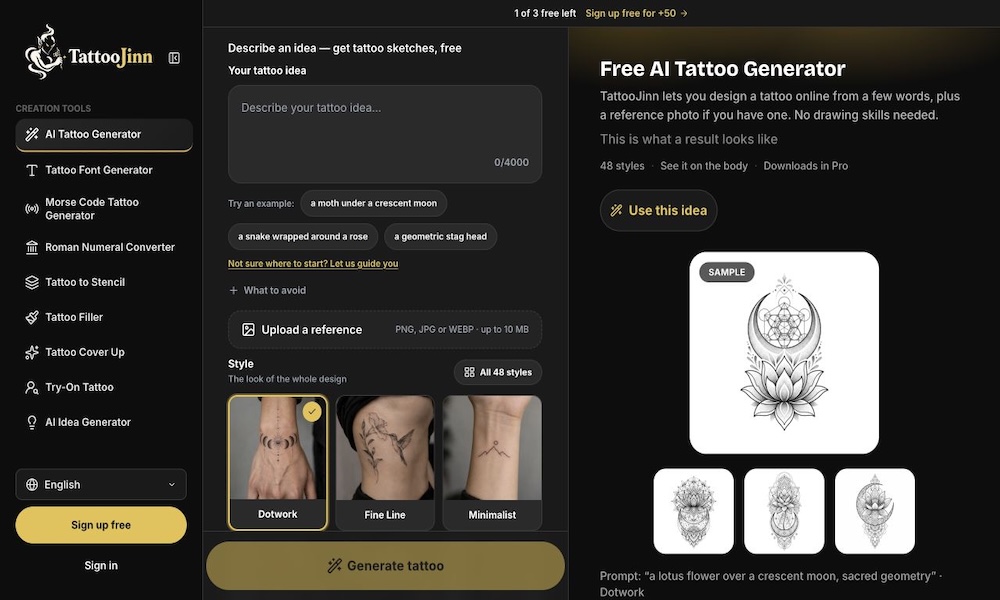
TattooJinn is built only for tattoos. You describe your idea, choose from 48 styles (fine line, traditional, blackwork, Japanese, geometric and more), and optionally upload a reference image up to 10 MB. Each try returns four designs, and a body preview places the design on a stock photo of the spot you choose. You refine by text or by painting over one area with a brush, and every edit saves as a new version. Tattoo to Stencil makes a draft stencil for one try.
Per the TattooJinn pricing page, guests get 3 generations showing one of four results, and a free account gets 50 generations with all four results, viewable in the app. Pro is $19 a month, with a 3-day free trial (card required), unlimited generations and HD downloads. Guest projects are kept for 30 days, account projects indefinitely.
Pros: wide style range, brush edits, body preview, stencil drafts, a generous free account.
Cons: downloads need Pro, and body previews use stock photos, not yours.
Best for: anyone exploring custom tattoo ideas before booking a consultation.
2. TattooDrafts: best for briefing your artist
TattooDrafts is designed around the conversation with your artist. You describe the idea and pick a style, placement and size, and it returns four design references, a check of which details will hold up at that size, and a one-page brief to bring to your appointment. Every image is labeled as a reference for the artist to redraw, which is exactly how most artists prefer to receive AI work.
It also has a strong free toolkit: lettering, name, Roman numeral and Morse code generators, a price calculator, size chart, pain chart by placement, and a stencil gallery with free PNG, SVG and PDF downloads. The free tier gives 2 preview sets a day and 3 stencil projects a week, with watermarks on previews. Per the TattooDrafts website, paid options are a 7-Day Pass at $9.99 (200 credits), Yearly at $59 (200 credits a month), Pro Monthly at $14.99 (400 credits) and Studio at $29 (1,000 credits).
Pros: realistic size checks, artist-ready briefs, many free planning tools, a one-time pass instead of a subscription.
Cons: free previews are watermarked; fewer styles than TattooJinn.
Best for: first-timers and anyone who wants their consultation to go smoothly.
3. Patchwork Tattoos: best for patchwork sleeves
Patchwork sleeves, made of many small separate pieces, are hard to plan one design at a time. Patchwork Tattoos generates concepts with guided controls for style, placement and subject, gives each a clean design and an on-skin preview, then a Patchwork Builder arranges the pieces into a full layout. A reviewed library of 73 collections offers free PNG downloads without sign-up, and there are photo-to-tattoo, font, stencil and cover-up tools. You get 2 free concepts; after that each concept costs 20 credits, and plans start around $96 a year per our listing.
Pros: the only tool here built for whole-sleeve planning; a free reviewed library.
Cons: credits add up for many concepts.
Best for: collectors planning a patchwork arm, leg or back.
4. Tattoos AI: best cheap unlimited ideas
Tattoos AI turns a written idea into several design concepts across 18+ styles such as dotwork, minimalist, watercolor and Japanese, with a "surprise me" button when you are stuck. The stencil maker and font generator are free without an account, and every account gets four designs with no card. The site advertises unlimited designs from $4.99 a month on its Basic plan, where designs go to a public gallery; keeping designs private needs Pro, so check the current price.
Pros: very low cost for unlimited ideas, free stencil and font tools.
Cons: public designs on Basic, and a body try-on is still in development.
Best for: brainstorming lots of variations on a budget.
5. Tinta Piel: best for trying a tattoo on your own photo
Tinta Piel is a Spanish-language virtual tattoo simulator. Upload a photo of your arm, back or leg (or use a sample model), add a design from its gallery or your own PNG or JPG, and drag, rotate, scale and fade it into place, all free without an account. An AI effect then blends the ink into your skin, matching lighting, curvature and texture, in one to a few minutes. The first AI pass is free with an account, then each costs 5 credits, and results have no watermark. The site says photos are not published or used for training.
Pros: realistic previews on your real body, free manual placement.
Cons: Spanish interface; not a design generator.
Best for: deciding size and placement before you book.
General AI image tools that work for tattoos
You do not need a tattoo app to get good ideas. General models are often free and more flexible; you just need to ask for tattoo-friendly output. See our guide to the best free AI image generators for more options.
6. Adobe Firefly: best free general generator
Adobe Firefly offers free daily generations, a style reference feature, and access to partner models including Google's Nano Banana. Adobe's own Firefly models are trained on licensed content and come with a clearer commercial position than most, which matters if you plan to sell flash sheets. Paid plans add monthly generative credits and more partner models, including Firefly Pro at $19.99 a month in the US; check Adobe's Firefly plans page for your region.
Pros: free daily use, clean line art with the right prompt, commercial clarity.
Cons: no tattoo-specific styles, placements or stencils.
Best for: free experimentation and artists making flash.
7. ChatGPT: best for refining by conversation
ChatGPT, with ChatGPT Images 2, is the easiest tool for iterating: "make the lines thinner," "remove the shading," "turn this into a single-line design," "add my daughter's birth flower." You can upload a sketch or a photo of an old tattoo for a cover-up idea and keep refining in one thread. The free plan includes limited image generation; paid plans start with Go at $8 a month. For prompt ideas, see our best ChatGPT prompts.
Pros: conversational edits, understands meaning and symbolism, works from your sketches.
Cons: daily limits on free use; may add shading or detail you did not ask for.
Best for: turning a personal story into a design concept.
8. Midjourney: best for artistic concepts
Midjourney produces the most striking concept art of any tool here, which makes it great for exploring a mood: ornamental, dark surreal, neo-traditional. It is less literal than ChatGPT and adds lots of detail, so ask for black ink tattoo flash, clean linework, white background. Plans start at $10 a month with no free tier, and images on lower plans are public. Our beginner's guide to Midjourney explains prompts and style references.
Pros: beautiful, distinctive art; style references for a consistent flash set.
Cons: no free plan; designs often too detailed to tattoo as-is.
Best for: large pieces and artists building a visual direction.
9. Ideogram: best for script and lettering
Most image models garble text. Ideogram is known for rendering words accurately, which makes it the best general tool for script tattoos, names, quotes and lettering inside a design. It has free daily generations. Even so, check spelling letter by letter, and let your artist finalize the lettering. TattooDrafts and Tattoos AI also have free font generators.
10. Recraft: best for clean vector linework
Recraft generates true vector images, so you can export clean SVG linework that scales without blur, which is closer to a stencil than a raster image. That makes it useful for geometric, minimalist and fine line designs. Per Recraft's terms, free-plan images are public and not licensed for commercial use. For more on vector-first tools, see our best AI logo generators.
Other tattoo apps you will see in rankings include BlackInk AI, Ink Studio, Tat Ink and InkHunter. They are not yet in our directory, so we have not reviewed them here.
How to turn an AI design into a real tattoo
Generate several directions, not one perfect image. Save the three or four you like most.
Check it at real size. Tiny details and lines packed close together tend to blur as ink spreads over the years. TattooDrafts' size check flags details that will not hold up.
Preview placement. Use a body preview or Tinta Piel on your own photo to judge size and flow.
Make a brief. Note what you love about each reference (the linework, the composition, a symbol) and what to avoid.
Book a consultation and bring references, not a final stencil. Most artists will redraw the design to fit your body and their style. Many will not tattoo an AI image directly, and some decline AI-based requests entirely, so ask first.
Respect the artist's work. Do not ask an artist to copy another artist's flash or a living artist's style via AI.
Prompt tips for tattoo-friendly AI output
State the style and the medium:
fine line tattoo design,American traditional flash,Japanese irezumi,blackwork,dotwork mandala.Ask for a white background and black ink for clean references and easier stencils.
Limit detail:
minimal shading, bold outlines, readable at 5 cm.Mention placement:
vertical composition for forearmorwraps around the ankle.Describe symbols, not just objects:
a swallow carrying a key, symbolizing returning home.Avoid copyrighted characters and logos, which most artists will not tattoo anyway.
FAQ
What is the best AI tattoo generator?
TattooJinn is the best all-round tattoo-specific generator, with 48 styles, four designs per try, a body preview and draft stencils, plus 50 free tries with an account. TattooDrafts is best if you want artist-ready briefs and size checks. For free general-purpose ideas, Adobe Firefly and ChatGPT both work well with tattoo-specific prompts.
Is there a free AI tattoo generator?
Yes. TattooJinn gives a free account 50 generations, TattooDrafts gives 2 preview sets a day plus free stencil and lettering tools, Patchwork Tattoos gives 2 free concepts, and Tattoos AI gives 4 free designs. Adobe Firefly and ChatGPT include free daily generations. Free designs may be watermarked or public, so check before sharing personal ideas.
Will a tattoo artist tattoo an AI design?
Many will use an AI image as a reference and redraw it to fit your body and their style, which usually gives a better tattoo anyway. Some artists refuse to work from AI designs, and few will tattoo one exactly as generated. Ask during booking, bring several references and a brief, and expect the artist to adapt it.
Can AI make a tattoo stencil?
Yes, as a draft. TattooJinn's Tattoo to Stencil, TattooDrafts' stencil maker and Tattoos AI's free stencil maker turn a design into line art, and Recraft can export clean vector SVG. Artists still check line weight, spacing and size, and most redraw or adjust the stencil before transferring it to skin.
How can I see what a tattoo looks like on me?
Use a virtual tattoo simulator. Tinta Piel lets you place any design on your own photo free, then blends it into your skin with AI. TattooDrafts offers realistic try-on previews with credits, and TattooJinn and Patchwork Tattoos show designs on stock body photos. Print the design at real size and tape it on for a final check.
Is it okay to get an AI-generated tattoo?
Yes, as long as you treat the AI image as a starting point. The risks are designs with too much fine detail to age well, accidental copies of existing art, and misspelled text. Working with a skilled artist, who adapts the design to your body and checks it at real size, solves all three.
Bottom line
Start with TattooJinn for custom ideas, or TattooDrafts if you want to walk into your consultation with a brief instead of a guess. Plan sleeves in Patchwork Tattoos, preview placement on your own photo with Tinta Piel, and use Adobe Firefly or ChatGPT for free experiments. Whatever you generate, let your tattoo artist have the final say.
Browse more creative tools in the AI image category and the AI lifestyle category. Building a tattoo tool we have missed? Submit it for a listing.