How to Use Perplexity AI (2026): A Step-by-Step Guide for Better Research
A practical walkthrough of Perplexity in 2026: when to use Search, Research and Create files and apps, how to pick sources and models, how Projects (formerly Spaces) and file uploads work, where Comet fits, and how to check every citation.
Quick answer: to use Perplexity AI well, ask a specific question in plain language, choose the right mode (Search for quick cited answers, Research for multi-source reports, Create files and apps for spreadsheets and dashboards), narrow the sources when it helps, then open the citations to confirm key claims. The free plan covers everyday searching. Pro, at $20 a month, adds model choice, far more Pro Searches and Research runs, bigger upload allowances and Perplexity Computer.
Perplexity is an answer engine: instead of ten blue links, it reads the web for you and writes a short answer with footnotes pointing to each source. This tutorial covers every main feature as of October 2026, based on Perplexity's official help center, pricing pages and changelog, plus common user feedback. Perplexity renames features often (Labs became Create files and apps, Spaces became Projects), so we use the current names and mention the old ones.


How to use Perplexity AI: quick tips for better results
Use Search for facts, Research for decisions. A quick question needs one pass. A buying decision, market scan or literature overview deserves a Research report.
Be specific about scope. Add a time frame, region, audience and format: "EU rules only, since 2025, as a table."
Pick sources on purpose. Academic for papers, Social for real user experiences, Finance for company data.
Ask follow-ups in the same thread instead of starting over.
Open at least two citations for anything that matters. The answer is a summary, the source is the evidence.
Step 1: Set up your Perplexity account
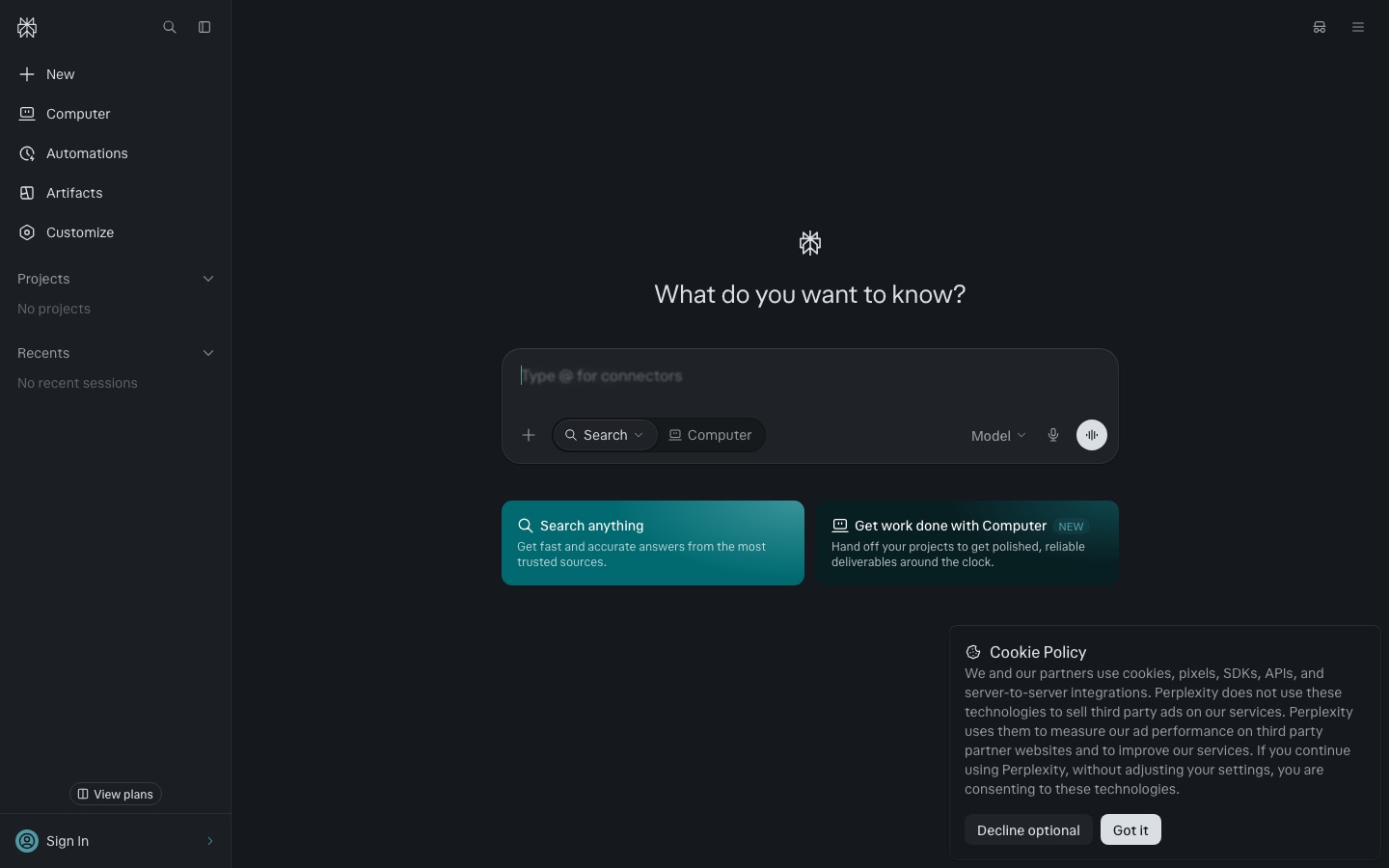
You can use Perplexity without an account, but signing in saves your threads to the Library and unlocks uploads and Projects. Sign in at perplexity.ai (or the Mac, Windows, iOS and Android apps, or the Comet browser), then open Settings to set your language and region. Turn on memory only if you want preferences remembered across threads, and check the AI training setting before uploading sensitive files.
Step 2: Ask your first question in Search mode
Search is the default mode. Type a full question, not keywords. Perplexity reads the top results and answers with numbered citations. Hover a number to preview the source, or open the Sources tab to see everything it read.
On paid plans, Search automatically upgrades to Pro Search for harder questions. Pro Search breaks the question into sub-queries, reads more pages and returns more citations. Free accounts get 3 Pro Searches a day, and basic searches are effectively unlimited, according to the Perplexity plan comparison.
Example prompts for Search
"What changed in the EU AI Act obligations for general-purpose AI models in 2026? Cite the official sources."
"Compare the battery life claims of the three newest MacBook Air models in a table, with links to Apple's spec pages."
"What are people on Reddit saying about the reliability of heat pumps in cold climates?" (with Social sources on)
Then refine with follow-ups: narrow the scope ("only studies after 2023"), change the format ("make it a checklist") or challenge it ("what is the strongest counterargument?").
Step 3: Choose your sources (the old Focus modes)
Perplexity used to call these Focus modes. Today you pick and combine sources from the menu in the search box.
| Source | What it searches | Use it for |
|---|---|---|
| Web | The open web (default) | News, how-tos, product research, general questions |
| Academic | Scholarly papers and journals | Literature checks, health and science claims, citations for essays |
| Social | Reddit, forums and social posts | Real user experiences, product complaints, community opinion |
| Finance | Market data, filings and company news | Stock lookups, earnings summaries, company comparisons |
| Your files and apps | Uploaded files and connected apps | Questions about your own documents and workspace |
Tip: run a contested question once with Web and once with Academic or Social. Where they disagree is where your judgment is needed.
Step 4: Use Research mode for deep, multi-source reports
Research (previously called Deep Research) is Perplexity's agentic mode. It runs dozens of searches, reads hundreds of sources, reasons over them and writes a structured report with citations. A run usually takes a few minutes, and you can export the result as a document or share the thread.
Click the mode selector in the search box and choose Research.
Write a brief, not a question: goal, scope, audience, and the format you want back.
Read the report, then ask follow-ups to expand weak sections or add missing angles.
Export or share it, and spot-check the citations behind every key number.
Example Research prompts
"I am choosing a CRM for a 12-person B2B sales team. Compare HubSpot, Pipedrive and Attio on pricing, automation, reporting and integrations as of 2026. End with a recommendation and a table."
"Map the competitive landscape for AI meeting note takers: top 10 products, target customer, starting price, and recent funding. Flag anything you could not verify."
Free accounts get one Research query per month. Pro and Max have monthly allowances that Perplexity describes as "average use" and "advanced use" without publishing exact numbers, so heavy users should watch the usage notice in the app.
Step 5: Build deliverables with Create files and apps (formerly Labs)
Labs, launched in 2025, now appears as Create files and apps in the search box menu. Instead of a written answer, it produces reports, spreadsheets, charts, dashboards, slide-style presentations and small interactive web apps. Generated files show up in an Assets tab and apps in an App tab, where you can preview and download them.
"Build a spreadsheet of the 20 largest US solar installers with revenue, headquarters, states served and source links."
"Make a one-page competitor brief on Notion vs Coda vs Confluence, then turn it into a 6-slide presentation."
Create files and apps is a paid feature with monthly limits. Check data against the linked sources, and treat generated apps as prototypes.
Perplexity Computer
Perplexity Computer, launched in February 2026 and extended to Pro subscribers in March, goes a step further: it runs long, multi-step tasks in a cloud workspace, using files, connected apps and the web. It is billed in credits. Perplexity's pricing page lists 4,000 bonus credits on Pro and 10,000 monthly credits plus a 35,000 credit bonus on Max.
Step 6: Choose a model (Pro and above)
Free users get Perplexity's default model selection. Paid users can pick a model per question from the model menu, or set a default. According to the What is Perplexity Pro help article, the lineup includes Perplexity's own Sonar models plus models from OpenAI, Anthropic, Google and xAI, with reasoning variants for complex analysis. The exact list changes every few months, so check the picker.
Best (auto): the right default for most people. Perplexity routes each query to a suitable model, and the help center says Best is not quota-limited.
Sonar, GPT, Claude or Gemini: pick one for fast lookups (Sonar) or when you prefer a particular model's style.
Thinking or reasoning models: for math, multi-step logic and analysis where accuracy matters more than speed.
Model Council: runs one question across several models and compares their answers. Check the pricing page for which plans include it.
If you mostly want one particular model for writing or coding rather than search, a direct subscription may suit you better. Our Perplexity vs ChatGPT comparison and Claude vs ChatGPT guide cover that choice.
Step 7: Organize recurring work with Projects (formerly Spaces)
On July 30, 2026, Perplexity renamed Spaces to Projects, and existing Spaces migrated automatically. A Project is a hub for ongoing work: it holds instructions, files, priority links and connected tools, and every thread inside it inherits that context.
Create a new Project from the sidebar, or convert an existing thread into one.
Write instructions: who you are, what the project is for, the tone and format you want, and any sources to prefer or avoid.
Upload reference files and add priority links (your docs, a competitor's pricing page, a journal).
Optionally connect tools like Google Drive or Notion, and turn on Brain, which remembers past work in the Project.
Invite teammates as viewers or editors. Personal memory and connector credentials stay private.
Good Project ideas: a thesis with your reading list, a weekly competitor watch, or a client account with its brand guidelines.
Step 8: Upload files and images
Click the attachment icon to add PDFs, text and code files, spreadsheets, images, audio and video. Perplexity's file uploads article sets a 40 MB limit per file. Audio and video are transcribed into searchable text, though visual content in video is not indexed. Short files are read in full, while for long files Perplexity extracts the most relevant parts, which is worth remembering before you ask about a detail on page 300.
Uploads count against a rolling weekly allowance on Free, Pro and Max. Turn web sources off to answer only from the file. For heavy document work, see our guide to the best AI PDF tools, or our NotebookLM tutorial for answers grounded strictly in your sources.
Step 9: Use Comet, Perplexity's AI browser
Comet is Perplexity's Chromium-based browser, free to download for Mac, Windows, iOS and Android from the Comet page. Because it is built on Chromium, it supports most Chrome extensions and feels familiar from the first minute. The difference is the built-in Comet Assistant, which can read the page you are on and act across tabs.
"Summarize this article and list the claims that need a source."
"Compare the three laptops in my open tabs on price, weight and battery in a table."
Assistant tasks are metered by plan, and the plan table lists no Comet Assistant allowance on Free. Review each step before any browser agent shops, emails or fills forms for you.
How to verify Perplexity's citations
Citations make Perplexity checkable, not automatically correct. The usual failure is a real source that says something slightly different or is out of date.
Open the source behind every number you plan to reuse. Search the page (Ctrl+F or Cmd+F) for the figure.
Check the date. Prices, laws and product specs change. Prefer sources from the last year.
Prefer primary sources. An official pricing page, a filing or the paper itself beats a blog summarizing it.
Watch for citation stacking. Five citations from similar SEO sites are weaker than one primary source.
Ask Perplexity to check itself. "Which claims in your answer are not directly supported by a cited source?" often surfaces weak spots.
Perplexity Free vs Pro vs Max: limits and pricing
Plans and limits below come from Perplexity's help center and pricing page as of October 2026. Perplexity does not publish exact Pro and Max quotas for consumer plans, only "average use" and "advanced use" tiers.
| Feature | Free | Pro | Max |
|---|---|---|---|
| Price | $0 | $20/mo, or $17/mo billed annually | $200/mo, or $167/mo billed annually |
| Basic searches | Effectively unlimited | Unlimited | Unlimited |
| Pro Search | 3 per day | Weekly limit (average use) | Weekly limit (advanced use) |
| Research | 1 per month | Monthly limit (average use) | Monthly limit (advanced use) |
| Create files and apps | Not included | Monthly limit | Higher monthly limit |
| Model choice | No | Yes | Yes, plus top reasoning models |
| File uploads | Limited | Weekly allowance | Higher weekly allowance |
| Perplexity Computer | No | Included, 4,000 bonus credits | 10,000 credits/mo plus bonus |
Verified students and educators can get Education Pro for $10 a month. Teams can buy Enterprise Pro from $40 per seat per month, which publishes concrete limits (400 Pro Searches a week and 50 Research queries a month) and adds admin controls and stricter data handling. Developers who want Perplexity's search inside their own apps should look at the Sonar API instead, which we compare in Exa vs Tavily vs Perplexity API.
Is Perplexity Pro worth it?
Pro pays off if you run serious research questions every week, want Research reports regularly, or want one subscription covering several frontier models. For quick factual questions, the free plan is enough. Max only makes sense if you live in Computer and Research all day.
Common mistakes (and how to fix them)
Typing keywords instead of questions. "best crm" gets a generic list. "Best CRM for a 5-person agency under $50 a seat, with Gmail sync" gets a usable answer.
Using Research for simple lookups. It burns a limited monthly allowance. Use Search first and escalate only when the answer is thin.
Trusting the summary over the source. Always open the citation for figures you will quote.
Uploading huge files and asking about one line. Long files are partly extracted, so point to the section or split the file.
Troubleshooting
Answer cites weak or irrelevant sites: switch to Academic or add "use only official or primary sources" to the prompt.
Answer is out of date: include the year in the question.
Hit a limit: the usage notice shows when your window refreshes. Free Pro Searches reset daily, paid Pro Search runs on weekly windows, Research on monthly windows.
File will not upload: check the 40 MB limit and your weekly upload allowance, or compress or split the PDF.
Model you want is missing: advanced models can be limited during heavy-usage weeks. Use Best or try later.
Who should use Perplexity
Perplexity is the best default for questions about what is true right now. For writing or coding, ChatGPT or Claude do more. For academic literature, pair it with Consensus or Elicit, which search only peer-reviewed papers. Our roundup of the best AI research tools covers those in depth, and the best AI tools for students shows how Perplexity fits a study stack.
FAQ
Is Perplexity AI free to use?
Yes. The free plan includes effectively unlimited basic searches with citations, 3 Pro Searches per day, one Research report per month and limited file uploads. You can use it without an account, though signing in saves your history. Pro costs $20 a month and adds model choice, much higher limits, Create files and apps and Perplexity Computer.
What is the difference between Perplexity Search and Research?
Search answers a question in one fast pass, usually in seconds, with a handful of citations. Research (formerly Deep Research) runs dozens of searches, reads hundreds of sources and writes a structured report over several minutes. Use Search for facts and quick comparisons, and Research for decisions, market scans and literature overviews.
How do I use Perplexity for academic research?
Turn on Academic sources so answers draw from scholarly papers, ask specific questions with a date range, and use Research mode for literature overviews. Then open every paper you plan to cite and confirm the finding yourself. For systematic reviews, combine Perplexity with paper-only tools like Consensus or Elicit, and manage references in a citation manager.
Can Perplexity read PDFs and documents?
Yes. Upload PDFs, text files, spreadsheets, images, audio or video up to 40 MB each, then ask questions about them, with or without web sources. Short files are read in full, while long files are partly extracted. Uploads count toward a rolling weekly allowance that is higher on Pro and Max.
What happened to Perplexity Spaces and Labs?
Both were renamed. Spaces became Projects on July 30, 2026, with existing Spaces migrated automatically, and Projects added Brain memory, connectors and team roles. Labs now appears as Create files and apps in the search box menu. It still builds reports, spreadsheets, dashboards and simple web apps from a prompt.
Is Perplexity better than ChatGPT?
For quick, sourced answers about current events, products and facts, Perplexity is usually faster and easier to verify. ChatGPT is stronger for writing, brainstorming, image generation, voice and coding. Many people use both. Our Perplexity vs ChatGPT comparison breaks down where each one wins and which subscription makes sense.
Is Perplexity accurate?
It is more checkable than a chatbot because every claim links to a source, but it can still misread pages, rely on weak sites or mix up figures. Treat answers as a well-sourced first draft. Open citations for anything important, prefer primary sources, and add a date or region to your question when it matters.
Final verdict
Learning how to use Perplexity AI is mostly learning when to escalate. Start every question in Search with a specific, scoped prompt. Switch sources when the topic calls for papers or community opinion, move to Research when a decision depends on the answer, and use Create files and apps or Computer for finished deliverables. Never skip the citation check. Used that way, the free plan is a better search engine, and Pro is one of the best-value research subscriptions available in 2026.
Explore more tools like Perplexity in our AI research tools category or the AI chat category, and browse the full AI tools directory. Built a research tool we should know about? Submit it for a listing.