How to Use Gemini (2026): Step-by-Step Guide for Beginners
A practical tutorial for Google Gemini in 2026: sign in, write better prompts, pick between Flash and Gemini 4 Argon, connect Gmail and Drive, run Deep Research, use Canvas, create images and video, talk with Gemini Live, and move your Gems to the new skills before they retire.
Quick answer: how to use Gemini. Open gemini.google.com or the Gemini app, sign in with your Google account, and type or speak your request. Use the Tools menu for Deep Research, Canvas and image creation, type @ to pull in Gmail, Drive or Calendar, and use Gemini Live on your phone to talk it through. The free plan runs on the Flash-Lite model; Google AI Pro ($19.99/mo) unlocks Google's new flagship, Gemini 4 Argon.
Google Gemini is Google's AI assistant, built into Android, Chrome, Gmail, Docs and the rest of Google's apps. Its biggest advantages are that tight Google integration, very long context on paid plans, and image and video generation in the same app. This guide follows Google's official help center, release notes and subscription page as of October 2026, plus public user feedback. Gemini has changed a lot this fall, including a new flagship model and the retirement of Gems, so we flag what is new as we go.

Gemini in 60 seconds
Cost: free with a Google account. AI Plus is $4.99/mo, AI Pro $19.99/mo, AI Ultra from $99.99/mo.
Current models: Flash-Lite (free), Flash (AI Plus), and Gemini 4 Argon plus Pro and Flash (AI Pro and Ultra).
Where it runs: web, Android, iPhone, a Windows app (since September 10, 2026), a Mac app, Chrome and the Workspace side panel.
Best features: Deep Research, Canvas, @ mentions for Gmail and Drive, Gemini Live voice, image editing, video on paid plans.
Big change: Gems are being replaced by skills. Personal Gems turn read-only on November 17, 2026.
Privacy switch: Keep Activity controls whether chats are saved and reviewed.
Which Gemini plan do you need?
Here is what each tier includes, according to Google's Gemini subscriptions page as of October 2026:
| Plan | Price | Models | Highlights |
|---|---|---|---|
| Free | $0 | Flash-Lite | Deep Research, Canvas, Gemini Live, image generation and editing, limited Flow access, 15 GB storage |
| AI Plus | $4.99/mo | Flash-Lite, Flash | 2x Free usage, Gemini in Gmail and Vids, video generation, 200 Flow credits, 400 GB storage |
| AI Pro | $19.99/mo | Gemini 4 Argon, Pro, Flash | 4x Free usage, 1M-token context, Gemini in Gmail and Docs, limited Veo 3.1 Lite trial, 1,000 Flow credits, 5 TB storage |
| AI Ultra | $99.99 or $199.99/mo | Highest Argon access, Deep Think | 5x or 20x Pro usage, Veo 3.1, 10,000 or 25,000 Flow credits, 20 TB+ storage, early Agent Mode |
Two changes matter for beginners. Since October 9, 2026, free users are limited to Flash-Lite, and AI Plus is losing access to the Pro model, as 9to5Google reported. If you need stronger reasoning, AI Pro is the real step up. For a deeper look at value, see our Gemini review and ChatGPT vs Gemini comparison.
Step 1: Sign in and choose your app
Go to gemini.google.com and sign in with your Google account. Work and school accounts need their admin to enable Gemini.
On Android, Gemini is usually built in: hold the power button or say "Hey Google". Otherwise install it from Google Play.
On iPhone, install the Gemini app from the App Store.
On Windows, install the Gemini app and use its keyboard shortcut to open it over any window. On Mac, install the Gemini Mac app.
In Chrome, type
@geminiin the address bar followed by your question.
Step 2: Learn the interface
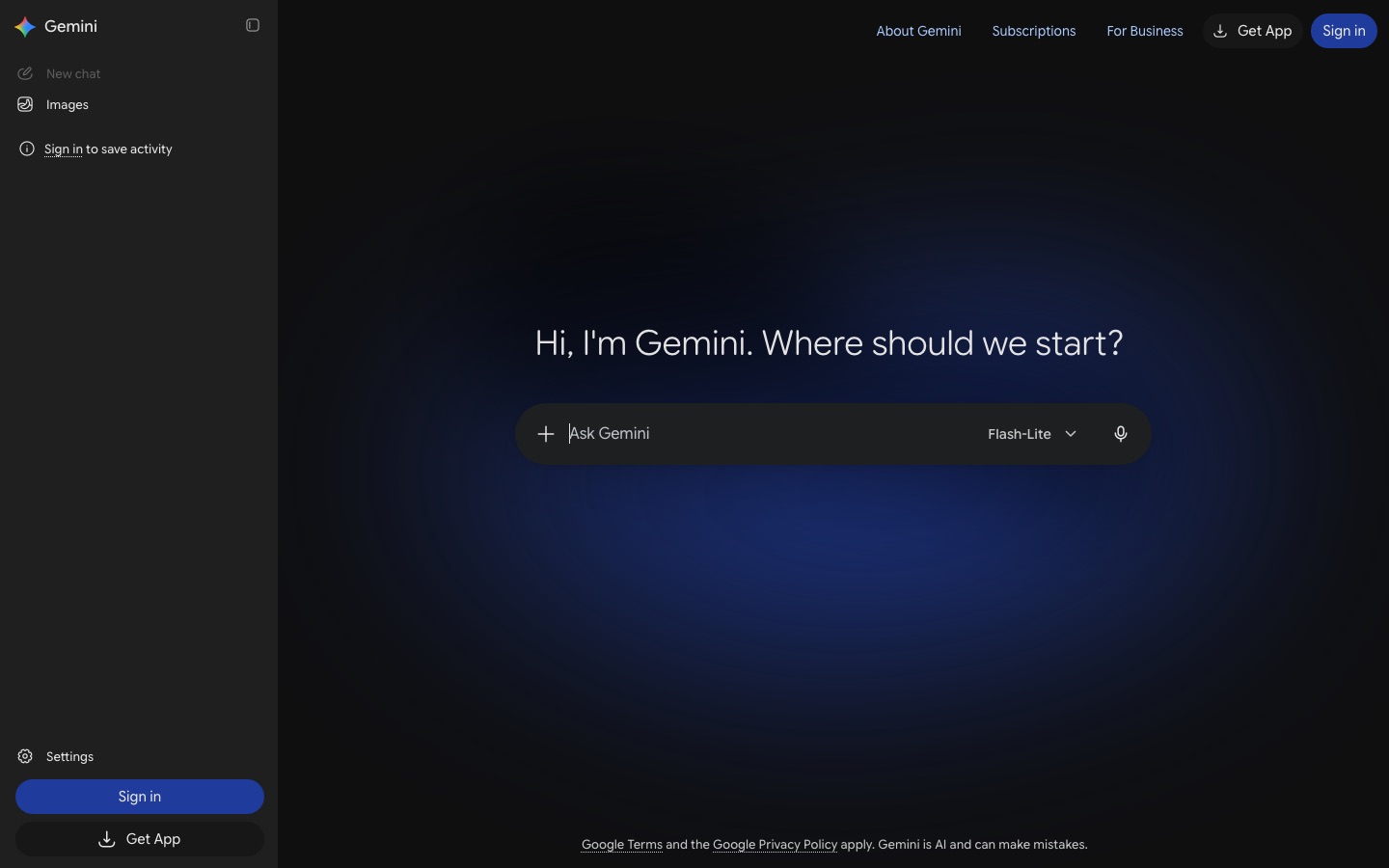
Chat list (left): new chat, recent chats and search. You can pin, rename and delete chats.
Model picker: switch between the models your plan includes, and turn on extended thinking for complex problems.
Tools menu: opens Deep Research, Canvas, image creation, video, Guided Learning and more.
Customise menu: added on October 13, 2026, it sets how Gemini responds, manages skills and connects more than 40 apps, per Google's release notes.
Below each answer: copy, share, export to Docs or Gmail, regenerate, or use the "G" button to double-check claims against Google Search.
Step 3: Write your first prompts
Gemini responds best to the same structure that works everywhere: a persona or audience, a clear task, context and a format. Paste or attach the real material whenever you can.
| Weak prompt | Better prompt |
|---|---|
plan a party | Plan a 7th birthday party for 12 kids in a small backyard, $200 budget, 2 hours. Give a schedule, a shopping list and two rainy-day backups. |
summarize my emails | @Gmail Summarize unread emails from this week that need a reply from me. Group them by urgency and draft a one-line reply for each. |
explain this chart | Attach a screenshot and ask: Explain what this chart shows to someone with no finance background, and tell me the one trend that matters most. |
Then refine: shorter, more formal, turn this into a table. Start a new chat when you change topics. For 55 copy-paste templates that work in Gemini as well as ChatGPT, see our best ChatGPT prompts library.
Step 4: Pick the right model
| Model | Use it for | Plans |
|---|---|---|
| Flash-Lite | Quick questions, rewrites, everyday help | All plans |
| Flash | Faster general work, longer documents, light coding | AI Plus and up |
| Pro | Complex reasoning, analysis, coding | AI Pro and Ultra |
| Gemini 4 Argon | Google's frontier model for complex, multi-step tasks | AI Pro and Ultra (since October 13, 2026) |
| Deep Think | Maximum parallel reasoning on very hard problems | AI Ultra, coming to AI Pro |
Stronger models and higher thinking use more of your limit, so keep Flash-class models for routine work. Google has also been adding low, medium and high effort levels to the picker; check what yours shows.
Step 5: Connect Gmail, Drive, Calendar and other apps
Gemini's biggest edge is that it can read your own Google data when you allow it. Type @ in a chat and pick an app:
@Gmail Find the confirmation for my flight to Denver and list the times and seat.@Google Drive Summarize the Q3 planning doc and list open decisions.@Google Calendar What does my Thursday look like, and where could I fit a 1-hour focus block?@YouTube Summarize this video and give me the 5 key steps.(paste the link)
Third-party apps such as Spotify, Airtable or Adobe can be connected from the Customise menu. On paid plans, Gemini also appears in a side panel inside Gmail, Docs, Sheets and Slides, where it works with the file you have open: Draft a reply to this thread accepting the proposal but asking for a June start date.
Step 6: Run Deep Research
Open Tools and choose Deep Research (it is on the free plan, with limits).
Ask a scoped question:
Research the pros and cons of heat pumps vs gas furnaces for a 1,500 sq ft home in Minnesota, including installation costs and rebates. Cite sources.Review the research plan Gemini proposes, edit it if needed, and click Start research.
Wait a few minutes while it reads many sources, then review the cited report.
Export it to Google Docs, or ask Gemini to turn it into a quiz, infographic or audio overview.
Treat the report as a well-sourced first draft. Open the citations for anything you will act on. If a run gets stuck on planning, restart it with a narrower question.
Step 7: Write and build with Canvas
Canvas opens a side-by-side editor for longer writing and code. Choose Tools, Canvas, then ask for a draft: Write a two-page proposal for a community garden, with a budget table. Highlight any paragraph to ask for changes, adjust length or tone, and export to Google Docs. Canvas also builds small web apps, quizzes and interactive pages you can preview and share, and as of October 2026 you can export those apps directly to Google Sites.
Gemini can now create presentations, documents and spreadsheets in chat with live previews, and slide decks download as PPTX or PDF. If you are building decks often, compare it with the dedicated tools in our best AI presentation makers guide.
Step 8: Create and edit images and video
Ask for an image in plain language or upload a photo to edit. Google's Nano Banana image models handle generation and precise edits: Replace the gray sky in this photo with a soft sunset and keep everything else the same. Be concrete about style, composition and color for better results.
Video needs a paid plan. AI Plus includes video generation, AI Pro adds a limited trial of Veo 3.1 Lite plus 1,000 monthly credits in Google Flow (Google's filmmaking app), and AI Ultra gets full Veo 3.1 and the newer Gemini Omni in Flow. Describe the shot, camera movement and sound: A slow drone shot over a misty pine forest at sunrise, birdsong, 8 seconds.
Step 9: Talk with Gemini Live
Tap the Live icon in the mobile app to have a spoken, back-and-forth conversation. You can interrupt, change topics and ask follow-ups naturally. Share your camera to ask about what you see ("what plant is this, and why are its leaves yellow?") or your screen to get help with whatever app you are in. It is ideal for brainstorming on a walk, language practice or rehearsing a presentation.
Step 10: Move from Gems to skills
Gems, Gemini's custom assistants, are being retired. Per Google's Gems to skills help page, for personal accounts:
November 17, 2026: Gems become read-only. You can view them but not use, edit or create them.
December 17, 2026: Gems are removed. Google converts them to skills automatically, with supported files.
Workspace accounts move later: March 2027 for business and June 2027 for education.
Download files attached to Gems before December 17 if you need them; audio, video, legacy Office files and archives do not carry over.
Skills are reusable instructions that Gemini can apply automatically when they fit your prompt, or that you call by typing / and the skill name in any chat. You can have up to 100 active skills, and you can combine several in one chat. A good first skill: When I paste meeting notes, return a summary, decisions and an action item table with owners and due dates. Skills do not yet work with Canvas, Deep Research or video creation.
Step 11: Go further with Gemini Notebook and coding tools
For research grounded only in your own files, Gemini Notebook (formerly NotebookLM) is excellent, and you can now type @Gemini Notebook in a chat to create notebooks, add sources or pull information from them. Our guide on how to use NotebookLM walks through it. Developers can start a coding agent from the Mac app, which now has Google's Antigravity built in, or prototype with Gemini models in Google AI Studio.
Privacy settings to check
Keep Activity (formerly Gemini Apps Activity): controls whether chats are saved to your account. You can turn it off or auto-delete after 3, 18 or 36 months. Some features, including skills, require it to be on.
Human review: Google says reviewers may read some conversations to improve its products, so do not enter anything confidential.
Temporary chats: use them for one-off questions you do not want saved or used for personalization.
Connected apps: review which apps Gemini can access, and disconnect any you no longer use.
Work accounts: Workspace admins control Gemini settings, and business data is handled under your organization's terms.
Common mistakes and troubleshooting
"Not available for your account": your Workspace admin has not enabled Gemini, or you are under the age limit for a feature.
Gemini 4 Argon is missing: it requires AI Pro or Ultra. Update the app and check your plan.
Daily limit reached: wait for the reset, or switch to a lighter model.
Gemini ignores your email or file: use an @ mention, confirm the app is connected, and refresh the side panel.
Images miss the mark: add concrete details on style, composition and color, then edit in follow-ups.
Trusting every fact: use the double-check button and open citations before acting on answers.
FAQ
Is Google Gemini free to use?
Yes. Anyone with a Google account can use Gemini free on the web and in the apps. The free plan includes the Flash-Lite model, Deep Research, Canvas, Gemini Live and image generation and editing, with usage limits. Gemini 4 Argon, the 1M-token context and most video generation need a paid Google AI plan.
How do I use Gemini in Gmail and Google Docs?
In the Gemini app, type @Gmail or @Google Drive to search and summarize your email and files. On paid Google AI plans, you can also open the Gemini side panel inside Gmail, Docs, Sheets and Slides to draft replies, summarize threads or edit the open document. Work accounts need an admin to enable it.
What is Gemini 4 Argon?
Gemini 4 Argon is Google's new frontier model for complex, multi-step tasks. It began rolling out on October 13, 2026, to Google AI Pro and Ultra subscribers in the Gemini app and also powers AI Mode in Search for paying users. Free and AI Plus users stay on lighter Flash models.
What happened to Gemini Gems?
Google is replacing Gems with skills. For personal accounts, Gems become read-only on November 17, 2026, and are removed on December 17, 2026, with automatic conversion to skills. Work accounts follow in March 2027 and education accounts in June 2027. Download any files attached to your Gems before then.
Is Gemini better than ChatGPT?
For people who live in Gmail, Docs, Drive and Android, Gemini is often the better fit thanks to its integration, long context and bundled storage. ChatGPT is a stronger all-rounder for writing and agent tasks. Both have capable free plans and paid tiers around $20 a month, so try your real tasks in each.
Does Gemini save my conversations?
Yes, by default, when Keep Activity is on. You can turn it off, delete chats, or set auto-delete to 3, 18 or 36 months. Google notes that human reviewers may read some conversations, so avoid confidential information. Temporary chats are not saved to your history.
Bottom line
Learning how to use Gemini comes down to a few habits: write specific prompts, use @ mentions to bring in your Gmail and Drive, reach for Deep Research and Canvas for bigger jobs, and pick a model that fits the task. If you pay for Google storage anyway, AI Pro adds Gemini 4 Argon and a lot of value. Move any Gems to skills before November 17. To compare it with rivals, read our Claude vs Gemini comparison or our guides on how to use ChatGPT and how to use Claude.
Explore more AI assistants and everyday helpers in the AI productivity category and the AI research category. Built a tool we should list? Submit it for a listing.