OpenAI Codex vs Claude Code (2026): Which Coding Agent Wins?
OpenAI Codex and Claude Code are the two leading AI coding agents of 2026. Codex is bundled with every ChatGPT plan, even Free, and lives inside the new ChatGPT desktop app. Claude Code needs a paid Claude plan but remains the deeper, more configurable agent. Here is how they compare on workflow, models, limits and price.
Short verdict on OpenAI Codex vs Claude Code: choose Claude Code if you want the most configurable, autonomous coding agent available, with hooks, subagents, skills and deep CI support, and you are willing to pay at least $20 a month for a Claude plan. Choose OpenAI Codex if you already pay for ChatGPT, want generous usage on fast GPT models, or want to start free: Codex is now included on every ChatGPT plan. Both are excellent, and the gap between them is smaller in 2026 than it has ever been.
The two agents now look alike on paper. Each has an open command-line tool, IDE extensions, a desktop app, cloud tasks, GitHub code review, Slack, scheduled automations, subagents and a project instructions file. The differences are in the models, the depth of customization, the pricing model and the surrounding app. This comparison is based on official documentation, pricing pages and public developer feedback as of October 2026, not our own benchmark tests.


Quick verdict by use case
Cheapest way to start: Codex. ChatGPT Free and Go ($8) include it; Claude Code starts at $20.
Deepest customization (hooks, skills, plugins, subagents): Claude Code.
Long autonomous refactors in a big repo: Claude Code, by most public accounts, with Codex close.
Fast, high-volume small tasks: Codex, thanks to cheap GPT-6 Luna and GPT-6.1 Terra limits.
Non-coding agent work in the same app: Codex, since the ChatGPT app adds Chat and Work modes; Claude offers Cowork in its own app.
CI pipelines and scripting: Claude Code's headless mode is more mature, though Codex has an SDK and CLI exec mode too.
Using both: easy. Both read AGENTS.md, and both run inside VS Code and Cursor.
OpenAI Codex vs Claude Code at a glance
| OpenAI Codex | Claude Code | |
|---|---|---|
| Maker | OpenAI | Anthropic |
| Where it runs | Codex mode in the ChatGPT desktop app, web, mobile, Codex CLI, IDE extension, Codex Cloud | Terminal, VS Code and Cursor, JetBrains, Claude desktop app, web, mobile, Slack, Chrome, CI |
| Models | GPT-6.1 Sol, GPT-6.1 Terra, GPT-6 Astra, GPT-6 Luna and GPT-5.6 family | Opus 5.5 (default), Sonnet 5.5, Haiku 5.5, Fable 5.1 on eligible plans |
| Instructions file | AGENTS.md | CLAUDE.md (also reads AGENTS.md), plus auto memory |
| Extensibility | Skills, plugins, subagents, rules, MCP | Skills, plugins, subagents, hooks, MCP, Agent SDK, dynamic workflows |
| Open source CLI | Yes, Apache-2.0 | No |
| Free access | Yes, ChatGPT Free (GPT-6 Luna) | No |
| Paid from | $8/mo (Go), $20/mo (Plus) | $20/mo (Pro), $17/mo billed annually |
| Integrations | GitHub, Slack, GitLab (beta), Linear | GitHub, GitLab CI/CD, Slack, Chrome, channels |
What each agent is in 2026
OpenAI Codex
OpenAI Codex began as an open-source terminal agent in April 2025 and a cloud agent in May 2025. A standalone Codex desktop app followed in February 2026. On July 9, 2026, OpenAI folded that app into a unified ChatGPT desktop app with three modes, Chat, Work and Codex, and renamed the old ChatGPT app ChatGPT Classic. Codex itself was not retired: it is the coding mode in that app, and it still has its own CLI (codex), an IDE extension for VS Code, Cursor and Devin Desktop, and Codex Cloud for tasks that run on OpenAI's machines.
OpenAI's Codex documentation lists AGENTS.md instructions, subagents, rules, skills and plugins, git worktrees, scheduled automations, a code review workflow, sandboxing with permission profiles and an auto-review option. Usage grew fast: by mid-March 2026, Codex was reported to have passed two million weekly active users.
Claude Code
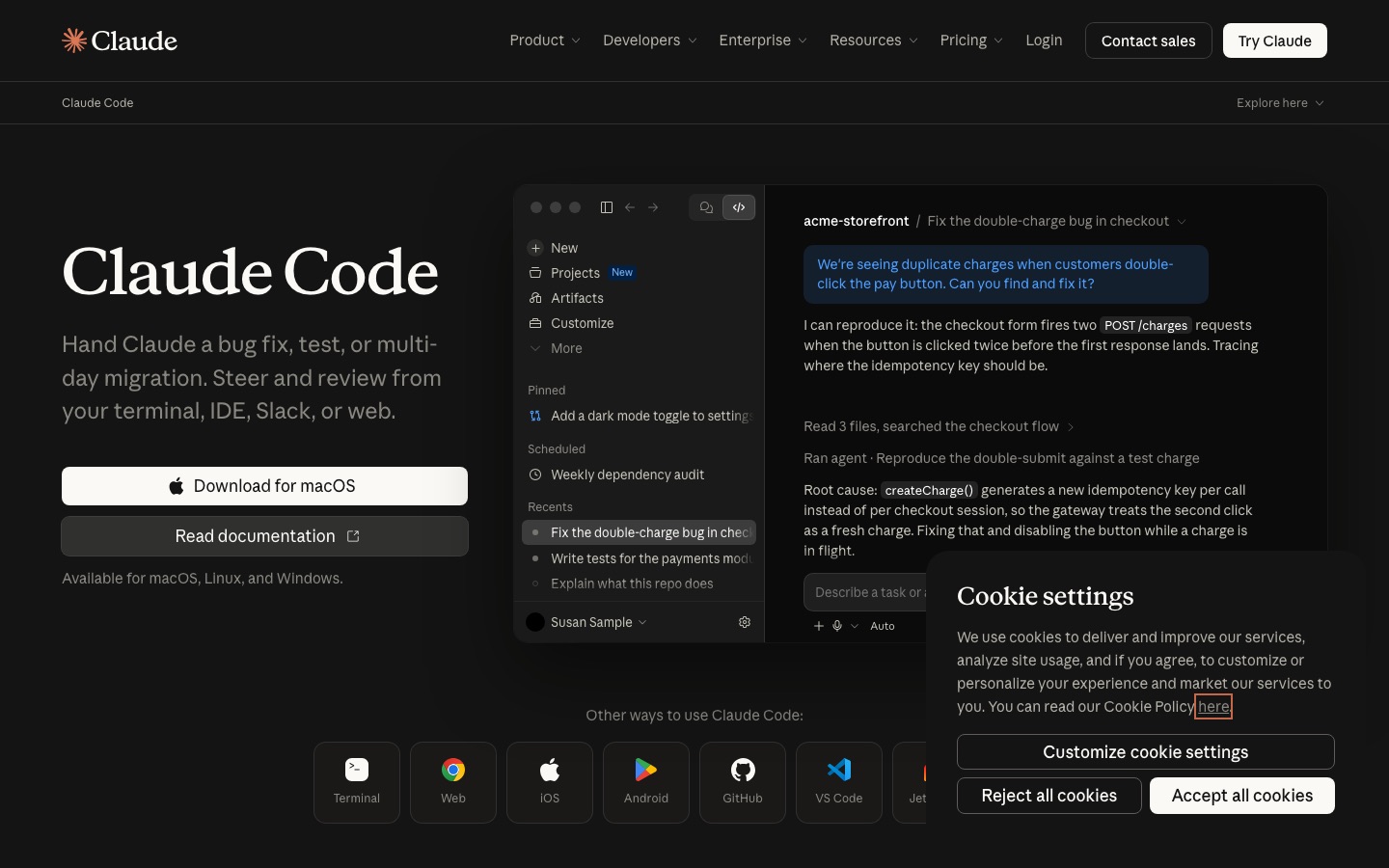
Claude Code is Anthropic's agentic coding tool. It started in the terminal and now runs in VS Code (and Cursor), JetBrains, the Claude desktop app, on the web at claude.ai/code, on mobile, in Slack and in CI. Every surface uses the same engine, so your CLAUDE.md files, settings and MCP servers follow you, as the Claude Code overview explains.
Its reputation rests on depth: subagents and background agents for parallel work, hooks that run your scripts at fixed points, skills and plugins for shareable workflows, auto memory, plan and auto permission modes, cloud and desktop scheduled tasks, Remote Control from your phone, and claude -p for headless scripting. Our guide on how to use Claude Code walks through it step by step.
OpenAI Codex vs Claude Code, dimension by dimension
Models and coding quality
Codex runs OpenAI models only. ChatGPT Plus includes GPT-6.1 Sol, the flagship for hard coding work, and GPT-6 Luna, a fast, cheap model; GPT-6.1 Terra handles visual reasoning and computer use, and GPT-6 Astra is the heaviest option, with tight limits. Fast and Ultrafast speed modes trade more usage for lower latency. GPT-5.5 was retired from Codex on October 14, 2026.
Claude Code runs Claude models only, defaulting to Opus 5.5 on paid plans, with Sonnet 5.5 and Haiku 5.5 available through /model, and Fable 5.1 on eligible plans (via usage credits on Pro). Effort levels let you trade depth for speed and cost.
Which is better at code? Public developer feedback in 2026 is split and changes with every model release. Claude models are widely praised for careful multi-file reasoning and following project conventions; GPT-6.1 Sol is praised for speed and strong results on well-specified tasks. We would not pick on model quality alone: try both on a real ticket.
Winner: tie, with Codex ahead on model choice by speed tier and Claude Code favored for long, careful work.
Workflow and surfaces
Both agents now cover the same ground: terminal, IDE, desktop, web, mobile and cloud. The feel differs. Claude Code is terminal-first and treats every other surface as a window onto the same session; you can move a session from the terminal to the desktop app with /desktop, or pull a cloud task down with claude --teleport. Codex is app-first: the ChatGPT desktop app puts Codex next to Chat and Work, sharing projects, files, a built-in browser and plugins, which suits people who mix coding with research, documents or spreadsheets.
Winner: Claude Code for developers who live in the terminal, Codex for people who want one app for coding and everything else.
Autonomy and agent controls
Both agents plan, edit files, run commands, test and iterate. Claude Code offers six permission modes, including read-only plan mode and an auto mode where a classifier approves safe actions, plus checkpoints to rewind code and conversation. Codex offers sandboxing with permission profiles, approval settings and an auto-review option, and runs parallel tasks in worktrees or in the cloud.
Where Claude Code still pulls ahead is orchestration. A lead agent can coordinate many subagents, background agents run full sessions you watch from one screen, and dynamic workflows script large fan-out jobs. Codex has subagents too, but its ecosystem of community workflows is smaller.
Winner: Claude Code, narrowly.
Customization and project instructions
Codex reads AGENTS.md, the cross-tool standard for agent instructions. Claude Code reads CLAUDE.md files at every level of the repo and can read AGENTS.md instead, and it builds auto memory as it works. On top of that, Claude Code's hooks are a genuine differentiator: deterministic scripts that run before or after actions, for example formatting every edited file or blocking writes to a folder. Both support MCP servers, skills and plugins.
Winner: Claude Code.
Code review, CI and automation
Codex reviews pull requests on GitHub, connects to Slack, Linear and GitLab (beta), and runs scheduled automations. Claude Code offers GitHub Code Review on every pull request, /code-review and /security-review locally, GitHub Actions and GitLab CI/CD integrations, cloud scheduled tasks that trigger on GitHub events or API calls, and Slack routing from bug report to pull request. Note that Codex cloud features, including GitHub review and Slack, are not available when you sign in with an API key.
For dedicated review tools, see our Graphite vs CodeRabbit comparison.
Winner: Claude Code for CI depth, tie for pull request review.
Open source and ecosystem
The Codex CLI is open source under Apache-2.0, so you can read and fork the harness, and it installs with npm, Homebrew or a one-line script. Claude Code is closed source but has a large plugin and skills ecosystem and an Agent SDK for building your own agents on its harness. Both work inside other tools: GitHub Copilot Pro+ and above can delegate tasks to either agent, and both install as extensions in VS Code and Cursor.
Winner: Codex for openness, Claude Code for ecosystem size.
Pricing and usage limits
Here is what each costs as of October 2026, from OpenAI's Codex pricing page and Claude's pricing page:
| Plan | Price | Coding agent access |
|---|---|---|
| ChatGPT Free | $0 | Codex with GPT-6 Luna in the desktop app (rolling out) |
| ChatGPT Go | $8/mo | Codex with GPT-6 Luna |
| ChatGPT Plus | $20/mo | Codex with GPT-6.1 Sol and GPT-6 Luna, five-hour limits, extra credits available |
| ChatGPT Pro | $100, $200 or $500/mo | Higher limits, no five-hour cap currently; Ultrafast on $500 |
| ChatGPT Business | $20 per user/mo annual, $25 monthly | Plus-level limits per seat, workspace credits |
| Claude Free | $0 | No Claude Code |
| Claude Pro | $20/mo, $17/mo annual | Claude Code with Opus, Sonnet and Haiku; Fable via usage credits |
| Claude Max 5x | $100/mo | 5x Pro usage per session |
| Claude Max 20x | $200/mo | 20x Pro usage per session |
| Claude Team | $25 Standard, $125 Premium per seat monthly (less annually) | Claude Code on every seat |
How the limits work
Codex usage is shared with ChatGPT Work and measured per five-hour window on Plus and Business, with weekly limits that may also apply. OpenAI publishes ranges rather than fixed numbers: on Plus, roughly 15 to 160 local messages per five hours with GPT-6.1 Sol and 350 to 3,000 with GPT-6 Luna, depending on task size. Cloud tasks can use more. Fast mode uses 2.5x your included usage. When you run out, Plus and Pro users can buy credits.
Claude Code usage counts against your Claude plan, shared with Claude chat, on a rolling five-hour session window plus weekly limits. When you hit a limit, you can wait or turn on usage credits, and /usage shows what is consuming your allowance.
Value verdict: at $20, both are excellent. Codex on Plus usually gives more raw message volume, especially with Luna for routine tasks. Claude Pro gives you Opus 5.5 for every task but tighter windows; heavy users tend to land on Max 5x at $100, the same price as ChatGPT Pro's entry tier. If you need API billing, both also run with an API key at standard rates.
Pros and cons
OpenAI Codex
Pros: included in every ChatGPT plan including Free, open-source CLI, generous limits with fast models, one app for coding plus Chat and Work, strong cloud tasks.
Cons: OpenAI models only, usage ranges are hard to predict, cloud features unavailable with API keys, frequent model retirements, fewer deterministic controls than hooks.
Claude Code
Pros: deepest customization (hooks, subagents, skills, plugins), excellent at long multi-file tasks, mature headless and CI story, same engine on every surface.
Cons: no free plan, Claude models only, five-hour and weekly limits bite on Pro, closed-source harness.
Using Codex and Claude Code together
Plenty of developers run both, and it is easy to set up:
Keep one AGENTS.md at the repo root with your conventions. Codex reads it natively, and Claude Code can read it in place of CLAUDE.md, or you can add a CLAUDE.md that imports it.
Use Codex for quick, high-volume tasks, such as small bug fixes, lint cleanups and test backfills on GPT-6 Luna or Terra.
Use Claude Code for large features and refactors, starting in plan mode, where its orchestration shines.
Let one review the other. Ask Codex to review a branch Claude Code wrote, or run Claude Code's
/code-reviewon a Codex pull request.Run both inside your editor. Both install as extensions in VS Code and Cursor, so you can switch panels without leaving your files.
At the entry tiers this costs $40 a month, or $28 if you pair ChatGPT Go with Claude Pro and accept Luna-only Codex.
Alternatives to both
GitHub Copilot: $10 a month for completions, an IDE agent, a cloud agent and a CLI, with Claude and GPT models in one bill. Read our GitHub Copilot review.
Cursor: the best AI code editor for hands-on work, now part of SpaceX's X Subscription. See our Cursor review and Claude Code vs Cursor.
Devin: Cognition's autonomous engineer for assigning whole tickets, with Devin Desktop (formerly Windsurf) as its editor.
Jules: Google's asynchronous coding agent with a free daily quota.
Aider and OpenCode: open-source terminal agents that work with any model and your own keys.
Our best AI coding tools guide covers the whole field, and Claude vs ChatGPT compares the subscriptions behind these two agents.
FAQ
Is Codex better than Claude Code?
Neither wins outright. Claude Code is more configurable and is often preferred for long, complex refactors, thanks to hooks, subagents and strong Claude models. Codex is cheaper to start, included in every ChatGPT plan, and offers generous usage on fast GPT models. Developers who test both on real tasks often keep both and use each where it is stronger.
Is OpenAI Codex free?
Yes, in a limited form. Since 2026, Codex is included on ChatGPT Free and Go, with GPT-6 Luna in the desktop app, subject to rollout. Plus at $20 a month adds GPT-6.1 Sol and higher limits, and Pro plans from $100 remove the five-hour cap. You can also run the Codex CLI with an API key at standard API rates.
Is Claude Code free?
No. Claude Code is included in all paid Claude plans, starting with Pro at $20 a month or $17 billed annually, but not in the free plan. You can also use it with an Anthropic Console API key billed per token, or through supported cloud providers in the terminal, VS Code and JetBrains.
Can Claude Code and Codex use AGENTS.md?
Yes. AGENTS.md is Codex's native instructions file, and Claude Code can read an existing AGENTS.md in place of a CLAUDE.md. Keeping your conventions in one AGENTS.md lets both agents, and tools such as GitHub Copilot and Cursor, follow the same rules without duplicating them.
Which has better usage limits, Codex or Claude Code?
At $20, Codex on ChatGPT Plus usually allows more messages, especially with GPT-6 Luna, though OpenAI gives wide ranges that depend on task size. Claude Pro runs Opus 5.5 by default with tighter five-hour and weekly windows. For all-day use, compare Claude Max 5x and ChatGPT Pro, both at $100 a month.
Is the Codex app still available?
The standalone Codex app was merged into the new ChatGPT desktop app on July 9, 2026. Existing installs updated automatically, and Codex now appears as a mode next to Chat and Work on Mac, Windows and Linux. The open-source Codex CLI, the IDE extension and Codex Cloud on the web are still available separately.
Can I use Codex or Claude Code inside GitHub Copilot?
Yes. On GitHub Copilot Pro+, Max, Business and Enterprise you can delegate tasks to Claude Code and Codex as third-party agents, a feature GitHub labels preview. That usage is billed through Copilot rather than your ChatGPT or Claude subscription, so check how many AI Credits each task uses.
Final verdict
Claude Code is still the agent to beat for developers who want maximum control and autonomy: hooks, subagents, skills and a mature CI story make it the better foundation for serious, repeatable workflows. OpenAI Codex is the better value and the easier start, bundled with every ChatGPT plan, backed by fast GPT-6 models and wrapped in an app that also does research and documents.
If you already pay for ChatGPT, start with Codex today; it costs nothing extra. If you code professionally and your work involves big, multi-step changes, a Claude Pro or Max plan for Claude Code is money well spent. And if you can afford $40 a month, running both, with one AGENTS.md between them, is the strongest setup in AI coding right now.
Compare every coding agent, AI editor and review bot we track in the AI code tools category, or browse AI agents. Building a developer tool we have missed? Submit it for a listing.