Claude Review (2026): Opus 5.5, Cowork and Claude Code
Our Claude review for October 2026: what Opus 5.5, Sonnet 5.5 and Fable 5.1 are, how the merged chat and Cowork experience works, what Claude Design, Docs and Slides add, what each plan from Free to Max gets, the usage-limit complaints, and when ChatGPT or Gemini is the better choice.
Verdict: in this Claude review, Claude comes out as the best AI assistant for serious writing, long documents and coding in late 2026, and the $20 Pro plan is one of the best values in AI because it includes Claude Code. It is for writers, analysts, lawyers, researchers, developers and teams who care more about the quality of the work than the number of features. Skip it if you need image or video generation, want generous unlimited-feeling usage on a small budget, or want an assistant woven into Gmail and Android, where Google Gemini fits better.
Anthropic shipped a lot this year: the Claude 5.5 model family in September and October, a merged chat and Cowork experience, Claude Design, Docs and Slides inside any conversation, Claude Science for researchers, and the Claude Duet preview. This review is based on Anthropic's official pricing, model documentation and release notes, plus public user feedback. We did not run our own benchmarks. Anthropic does not publish numeric usage caps, so check Claude's pricing page and your own usage meter before you upgrade.

Claude review at a glance
Best for: long-form writing and editing, analyzing long PDFs and contracts, agentic coding, and building documents, decks and small tools with AI.
Current models: Claude Opus 5.5 (flagship for most work), Sonnet 5.5 (fast), Haiku 5.5 (fastest), and Fable 5.1 (top tier for the hardest work).
Price: Free, Pro at $20/mo ($17/mo billed annually), Max from $100/mo, Team from $20/seat/mo, Enterprise from $20/seat/mo plus usage.
Standout features: Cowork in every chat, Claude Code, Artifacts, Claude Design, Docs and Slides, Research, connectors and skills.
Biggest weaknesses: no native image or video generation, and rolling five-hour plus weekly usage limits that heavy users hit.
Skip it if: you mainly want pictures, voice-first chat or Google-native workflows.
What is Claude, and what changed in 2026?
Claude is Anthropic's AI assistant, available on the web, desktop apps for Mac and Windows, and iOS and Android. It is known for careful reasoning, natural writing and an honest tone that will push back on a weak argument. Under the hood, the same models power Claude Code, Anthropic's coding agent, and a large share of third-party AI coding tools.
The 2026 timeline, based on Anthropic's release notes and news page:
April 17: Claude Design launched from Anthropic Labs for designs, prototypes, slides and one-pagers.
June 30: Claude Science, a research workbench for scientists, launched in beta on paid plans.
July 7: Cowork arrived on web and mobile, and Claude for Microsoft 365 gained write tools.
August 25: memory was expanded across chat and Cowork, with editable "Topics" in settings.
September 1: Claude Fable 5.1 launched as Anthropic's most advanced model.
September 16: chat and Cowork merged into one Claude, and Design, Slides and Docs became available in any conversation.
September 22 and 28: Claude Opus 5.5 and Sonnet 5.5 launched.
October 7: Haiku 5.5 launched, and Max and Team plans started including monthly API credits.
October 21: Claude Duet, a proactive agent app, opened as a US research preview for Pro and Max.
Claude models explained: Opus 5.5, Sonnet 5.5, Haiku 5.5 and Fable 5.1
Anthropic's models overview recommends Opus 5.5 as the starting point for most work. Anthropic says it performs at the level of Fable 5.1 on most tasks and costs 40% less to run than Opus 5. Sonnet 5.5 is the speed and value pick, more than 30% faster than Sonnet 5. Haiku 5.5 is the fastest and cheapest. Fable 5.1 sits above Opus for the most demanding reasoning and long-horizon agent work, at a higher price.
All four list a 1M-token context window and up to 128K tokens of output in the API, which is enough for several long books or a sizable codebase. In the apps, Free gets Sonnet and Haiku, Pro adds Opus with Fable available through usage credits, and Max and Team Premium seats can spend up to half of their weekly limits on Fable, according to the pricing page.
What this means for you: free users get a genuinely strong model in Sonnet 5.5. Pay for Pro when you want Opus 5.5 for difficult writing, analysis or code, and only think about Fable if Opus still falls short on your hardest tasks.
Key features in depth
One Claude: chat and Cowork merged
Since September 16, there is no separate Cowork tab to choose. As TechCrunch reported, Claude now routes each request itself, so the same conversation can answer a quick question, then take on a longer task that reads your files, uses connected apps and produces finished work. Chats, projects, connectors and skills carry over. Anthropic says customers struggled to pick the right tab, and the merge fixes that. The rollout started with Pro and Max, with Free and Team following later.
Claude Design, Docs and Slides
Three new ways to make things live inside any conversation. Claude Design builds visual designs and prototypes with on-canvas editing, and can import your design system. Claude Slides creates and edits presentations you can present or download as PDF or PowerPoint. Claude Docs writes living documents section by section, where you can ask questions and comment on finished parts, then share by link. All three are labeled beta, and Enterprise admins must switch them on. For dedicated slide tools, compare our best AI presentation makers.
Artifacts
Artifacts remain one of Claude's most distinctive features and are available on every plan, including Free. Ask for a calculator, a dashboard, a flowchart, an interactive explainer or a small web app, and Claude builds it beside the chat where you can use it, tweak it and share it. It is the fastest way for a non-developer to turn an idea into a working tool.
Claude Code
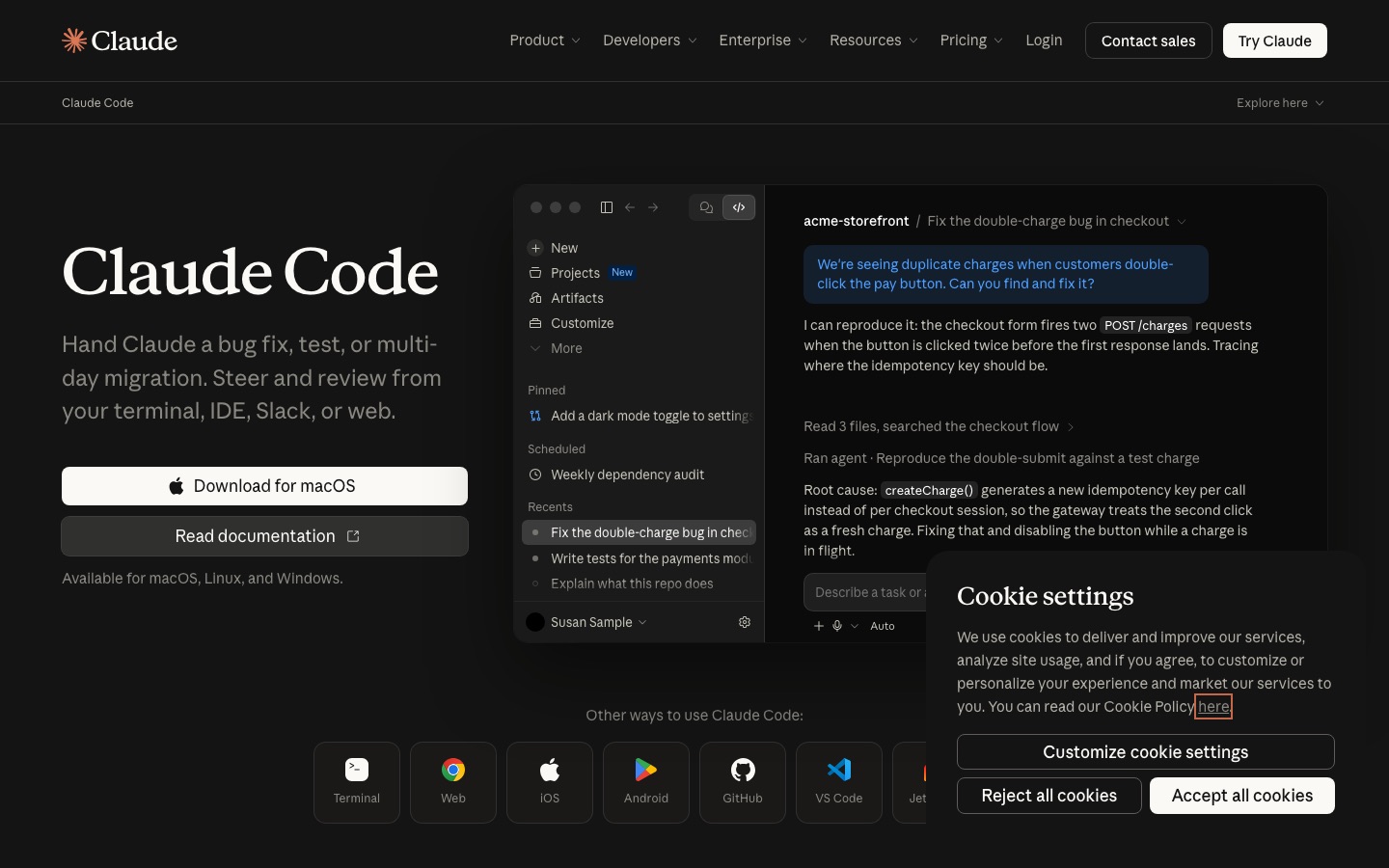
Claude Code is Anthropic's coding agent. It works in your terminal, IDE, desktop app or browser, reads your repository, edits files, runs tests and commands, and manages git until the task is done. It is included with Pro and above, which is a big reason developers subscribe. Our how to use Claude Code tutorial covers setup, and Claude Code vs Cursor and OpenAI Codex vs Claude Code compare it with the main rivals.
Research, web search and long documents
Claude searches the web on every plan. Research, a paid feature, runs a longer multi-step investigation across the web and your connected sources and returns a cited report. Where Claude really shines is long documents: paste a long contract, a research report or a book manuscript and it keeps track of details from start to finish, and it is good at telling you when something is not in the document. Projects keep reference files attached to every chat in a workspace.
Connectors, skills and Claude in Chrome
Claude connects to outside apps through connectors built on the Model Context Protocol (MCP), the open standard Anthropic introduced. The Claude Marketplace now lists thousands of connectors and plugins, including Gmail, Slack, HubSpot and QuickBooks. Skills package instructions and scripts so Claude handles a recurring job your way. Paid plans add Claude in Chrome, a browser extension that lets Claude read pages and act across your tabs, plus Claude for Microsoft 365 and Outlook.
Memory, voice and mobile
Memory is on by default for Free, Pro and Max (off by default for Team and Enterprise) and now works across chat and Cowork. You can view and edit what Claude remembers, and a separate setting controls whether sensitive topics such as health are remembered. Voice mode is available on every plan. It works well, but ChatGPT's voice experience is still the more popular for long spoken conversations.
Claude Duet and Claude Science
Claude Duet is a separate app in research preview for US Pro and Max subscribers. It runs on Opus 5.5 in the cloud, checks your connected accounts every few hours, sends a morning rundown and asks for approval before anything that sends, spends, signs or deletes. It draws on the same usage limits as normal chats, and Anthropic says it can still misjudge urgency. Claude Science is a workbench for computational research on paid plans, bundling scientific databases and tools into one environment.
Claude pricing (as of October 2026)
Prices come from Anthropic's official pricing page. Anthropic does not publish numeric message caps; limits are expressed relative to other plans and reset on a rolling five-hour window, with weekly caps on paid plans.
| Plan | Price | Models | What you really get |
|---|---|---|---|
| Free | $0 | Sonnet, Haiku | Chat, web search, file creation and code execution, memory, connectors, Artifacts, Design, Slides and Docs, up to 5 projects, voice, skills. No Claude Code or Research. |
| Pro | $20/mo, or $17/mo billed annually ($200/yr) | Opus, Sonnet, Haiku; Fable via usage credits | At least 5x Free usage per session, Claude Code, Research, unlimited projects, Claude in Chrome, Microsoft 365 and Outlook, Claude Science. |
| Max 5x / 20x | From $100/mo (5x); 20x tier higher, check the page | All models; Fable up to 50% of weekly limits | 5x or 20x Pro usage, higher output limits, priority at peak times, early features, $100 or $200 in monthly API credits. |
| Team | Standard $20/seat/mo annual ($25 monthly); Premium $100 ($125) | All models; Fable on Premium seats | Cowork, SSO, admin controls, central billing, enterprise search, no training on your content by default. 2 to 150 seats. |
| Enterprise | $20/seat/mo annual (20-seat minimum) plus usage at API rates | All models, including Fable | SCIM, audit logs, role-based access, custom retention, IP allowlisting, HIPAA-ready option. |
Is Claude Pro worth it?
For most people who use Claude for work, yes. Pro unlocks Opus 5.5, Claude Code, Research, unlimited projects and the Chrome extension for $20, or $17 a month on an annual plan. The catch is limits: if you run long Claude Code sessions every day, you will likely hit the weekly cap, and Max 5x at $100 is the realistic tier for full-time coding. Casual users can stay on Free, which is unusually generous with features.
Pros and cons
Pros
Best-in-class writing: natural prose, strong voice matching and fewer stock phrases than rivals.
Excellent long-document handling: 1M-token models and careful recall across long inputs.
Claude Code included with Pro: a top coding agent at no extra cost.
Builder features: Artifacts, Design, Docs and Slides turn chats into usable work.
Generous free plan: Artifacts, Design, connectors and skills are all on Free.
Strong admin and privacy story for Team and Enterprise.
Cons
No native image or video generation. Claude makes diagrams and SVG graphics, not photos.
Usage limits: the five-hour and weekly caps frustrate heavy users, and exact numbers are not published.
Fable is expensive and limited on most plans.
Several new features are still beta, and rollouts reach Free and Team later.
Voice mode is less central than in ChatGPT or Gemini.
Limitations and common complaints
The most common complaint by far, on Reddit and review sites through 2026, is usage limits. Paying Pro users, especially Claude Code users, report draining their weekly allowance in a few heavy days, and some argue that newer models that think harder by default burn through limits faster. Anthropic has run temporary promotions and raised Claude Code's five-hour limits this year, but the weekly cap remains the pain point. You can check your session and weekly usage in Settings, Usage.
Other recurring themes: Claude cannot create images, so marketers still need a second tool; it can be more cautious than Grok or ChatGPT on borderline requests; and new features roll out to Pro and Max first, which annoys Free and Team users. Like every assistant, it can still be confidently wrong, so verify facts and figures, especially from web research.
Practical fixes: use Sonnet 5.5 for routine work and save Opus or Fable for hard tasks; start a new chat instead of extending a very long one; keep reference files in a project rather than re-uploading; and upgrade to Max only after you have hit Pro limits several weeks in a row.
Claude vs the alternatives
| Assistant | Best at | Main paid plan | Pick it over Claude if |
|---|---|---|---|
| ChatGPT | Breadth: agents, images, voice, apps | Plus, $20/mo | You want image generation and the widest feature set |
| Google Gemini | Google apps, Android, video | AI Pro, $19.99/mo | You live in Gmail, Docs and Drive or need video |
| Perplexity | Cited answers | Pro, check official page | You mostly research quick factual questions |
| Grok | Real-time X and news | SuperGrok, $30/mo | You want live social context and fewer refusals |
| Cursor | AI code editor | Paid plans, check official page | You want an IDE first and a chat assistant second |
ChatGPT is the main rival. It does more things, including image generation, a polished voice mode and a huge app ecosystem, while Claude does fewer things with more care. Our Claude vs ChatGPT comparison and ChatGPT review cover that choice. Gemini is the better pick for Google Workspace and Android users; see Claude vs Gemini. For research with sources on every line, Perplexity is faster than either.
Who should use Claude?
Writers, editors and content teams: Pro, for Opus 5.5 drafts that need light edits.
Lawyers, analysts and researchers: Pro or Team, for long-document analysis and Research.
Developers: Pro to start with Claude Code; Max 5x if you code with it all day.
Founders and operators: Pro for Cowork, Docs, Slides and connectors across your tools.
Teams with compliance needs: Team or Enterprise, which do not train on your content by default.
Designers and marketers who need images: pair Claude with an image tool from our best AI image editors list.
Getting started? Our how to use Claude guide walks through projects, Artifacts and prompts that get the best out of it.
FAQ
Is Claude better than ChatGPT?
For writing, long documents and careful coding, many users prefer Claude. ChatGPT is better for image generation, voice conversations and breadth of features. Both cost $20 a month at the first paid tier, so the best test is to run your own real tasks through each for a week and keep the one that saves more time.
Is Claude Pro worth it?
Yes, if you use Claude for work several times a week. Pro costs $20 a month (or $17 a month billed annually) and adds Opus 5.5, Claude Code, Research, unlimited projects, Claude in Chrome and Microsoft 365 integration. Heavy daily coders may still need Max because of the weekly usage cap.
Is Claude free?
Yes. Claude's free plan includes Sonnet and Haiku models, web search, file creation, memory, connectors, Artifacts, Claude Design, Slides and Docs, voice and up to five projects. Usage resets on a rolling five-hour window. Claude Code, Research and the Opus and Fable models need a paid plan.
What is the difference between Claude Opus 5.5 and Fable 5.1?
Opus 5.5 is Anthropic's recommended model for most work, released September 22, 2026. Fable 5.1 is the top tier for the hardest reasoning and long agent tasks. Anthropic says Opus 5.5 matches Fable 5.1 on most work at a much lower cost, so most people should use Opus.
Can Claude generate images?
No, not natively. Claude can read and analyze images, and it can create diagrams, charts, SVG graphics and designs through Artifacts and Claude Design, but it does not generate photos or illustrations from a prompt. Use ChatGPT, Gemini or a dedicated image generator for that.
What are Claude's usage limits?
Anthropic does not publish fixed message counts. Usage runs on a rolling five-hour session window, with weekly caps on paid plans. Pro gets at least five times Free usage per session, and Max gets 5x or 20x Pro. Check Settings, Usage in Claude to see your current session and weekly progress.
Does Claude train on my conversations?
On Free, Pro and Max you control whether your chats are used to improve models in Claude's privacy settings. Team and Enterprise do not train on your content by default. For confidential client or company data, use a Team or Enterprise plan rather than a personal account.
Final verdict
Claude is the assistant to pick when the quality of the output matters most. Opus 5.5 writes and reasons beautifully, the 1M-token models handle long documents with care, Claude Code is included with Pro, and the merged Cowork experience with Design, Docs and Slides turns it into a place to finish real work, not just chat. The trade-offs are clear: no images or video, and usage limits that heavy users will feel. Start on the free plan, upgrade to Pro once Claude becomes part of your workday, and move to Max only if the weekly limit keeps stopping you.
Compare more assistants in the AI chat category and coding agents in the AI code category. If you build an AI tool we have missed, you can submit it for a listing.